
Your ClubRight Pay Card terminal is a Nova Modu, made by Nayax, and it arrives ready to use, already configured to work with your ClubRight Pay Card account. This article walks through the one-off steps to power on your new terminal and connect it to your local WiFi network, including the settings password the terminal asks for.
What is the settings password on my Nayax Nova terminal?
If the terminal asks for a settings password while you're setting it up, enter 260089. If that isn't accepted, try 00000000. You need it to open the device Settings, for example to connect the terminal to your WiFi (see the steps below).
Powering on the terminal
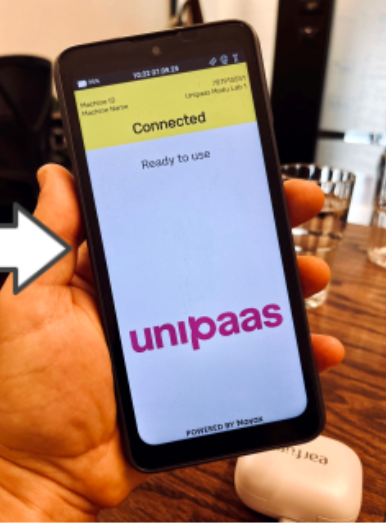
Press the power button on the side of the device to turn it on:
Connecting to WiFi
The terminal includes a built-in SIM card for mobile data connectivity, but we strongly recommend connecting it to your local WiFi network for the best performance.
Step 1: Access the device settings
Long press the yellow banner at the top of the screen
Tap the lock icon
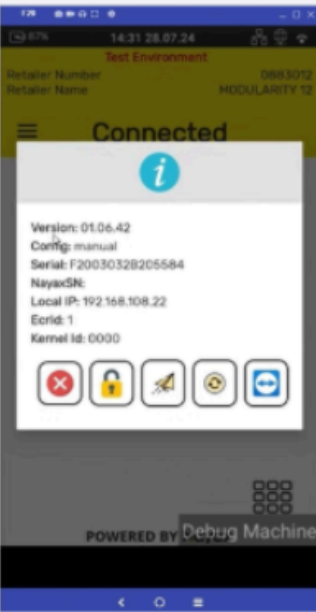
Use the Android buttons to navigate to the home screen
Tap Settings
Enter the device settings password: 260089 or 00000000
Step 2: Connect to your WiFi network
In Settings, go to Network & Internet, then Internet, and turn WiFi on
Select your WiFi network name (SSID)
Enter your WiFi password and tap Connect
For advanced connectivity details (IP address, serial number, and so on), see Device Details in the settings menu.
Once connected, your terminal is ready to accept payments. See Taking a payment with the ClubRight Pay Card terminal for how to process payments from the ClubRight till.
Have more questions about setting up your terminal?
If you run into issues during setup, our Customer Success team is happy to help. Reach out via the chat button at the bottom right of your ClubRight dashboard. For technical issues with the device itself, email clubrightpay@unipaas.com.