
You can clear or write off a member's debt, arrears or outstanding balance in ClubRight by applying a Complimentary / discount through Take payment. You can do this from Payments > Debtors, or from Members > Unpaid.
Important: For members paying by Direct Debit, check the status of the current or next payment before clearing an outstanding balance. If the payment is showing as Requested, the request has already been sent to the member's bank and may still be collected. Wait until the payment status has been updated with the outcome before clearing or writing off any remaining balance.
Option 1
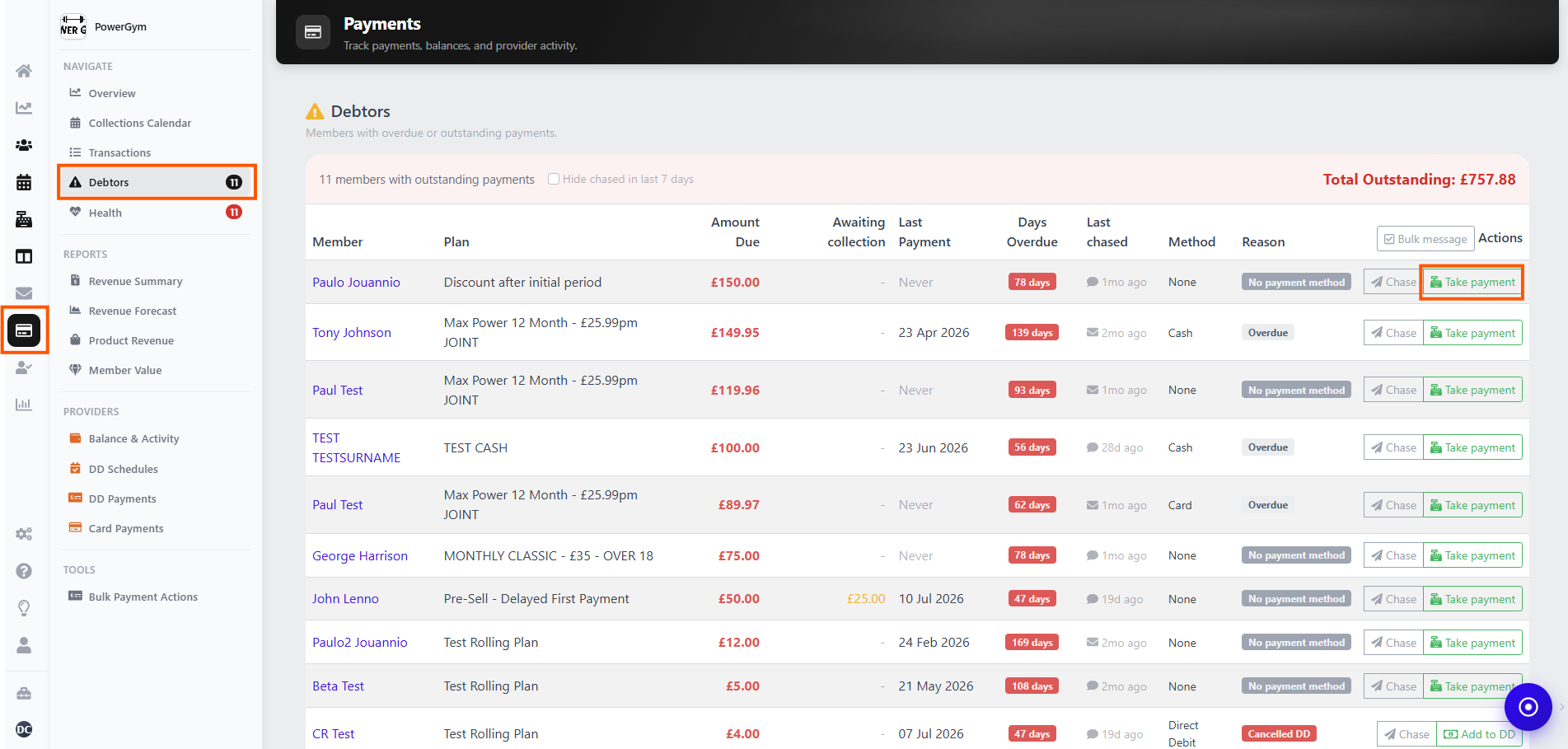
Go to Payments > Debtors.
Find the member whose debt or arrears you want to clear and select Take payment.
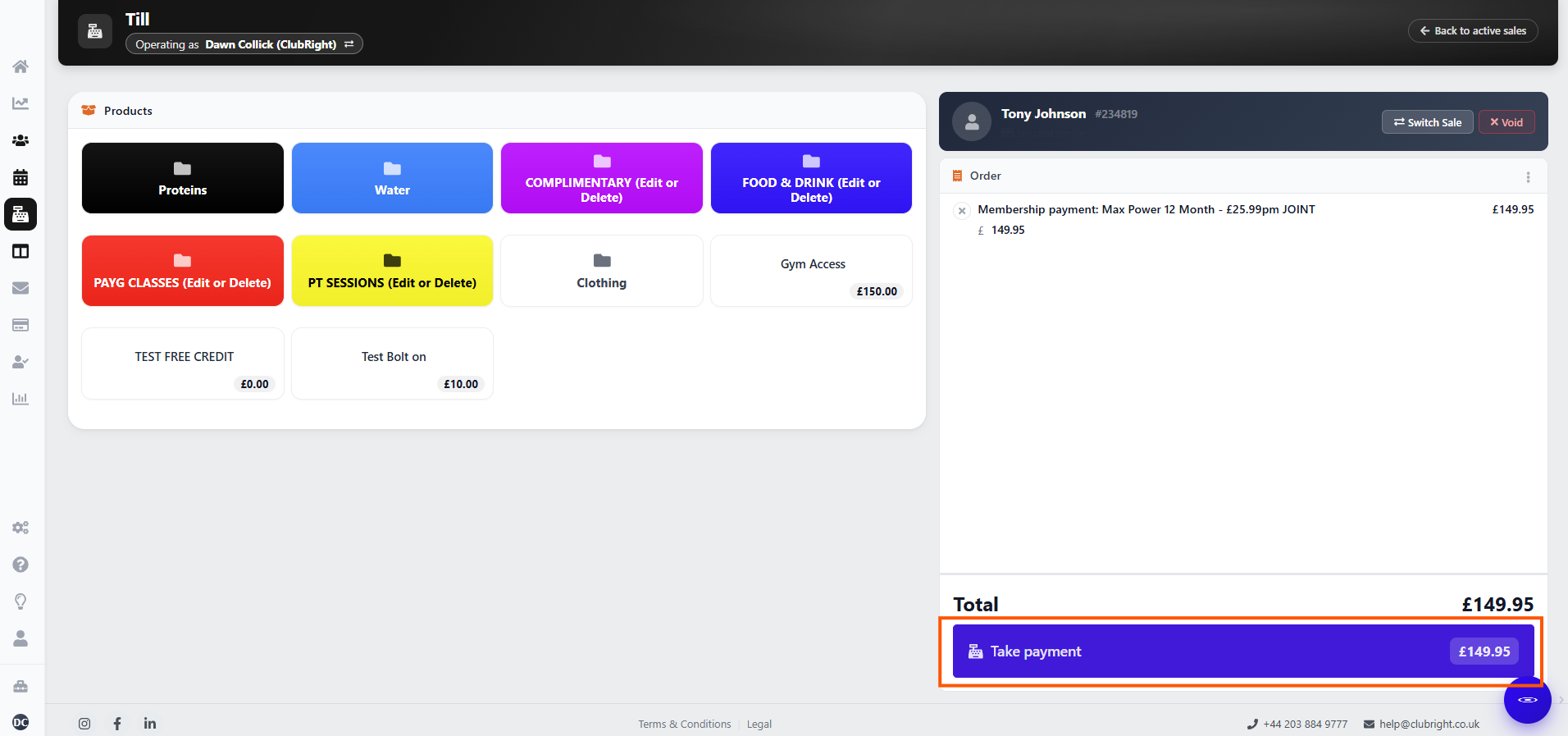
In the Till, check that the correct outstanding balance is displayed and select Take payment.
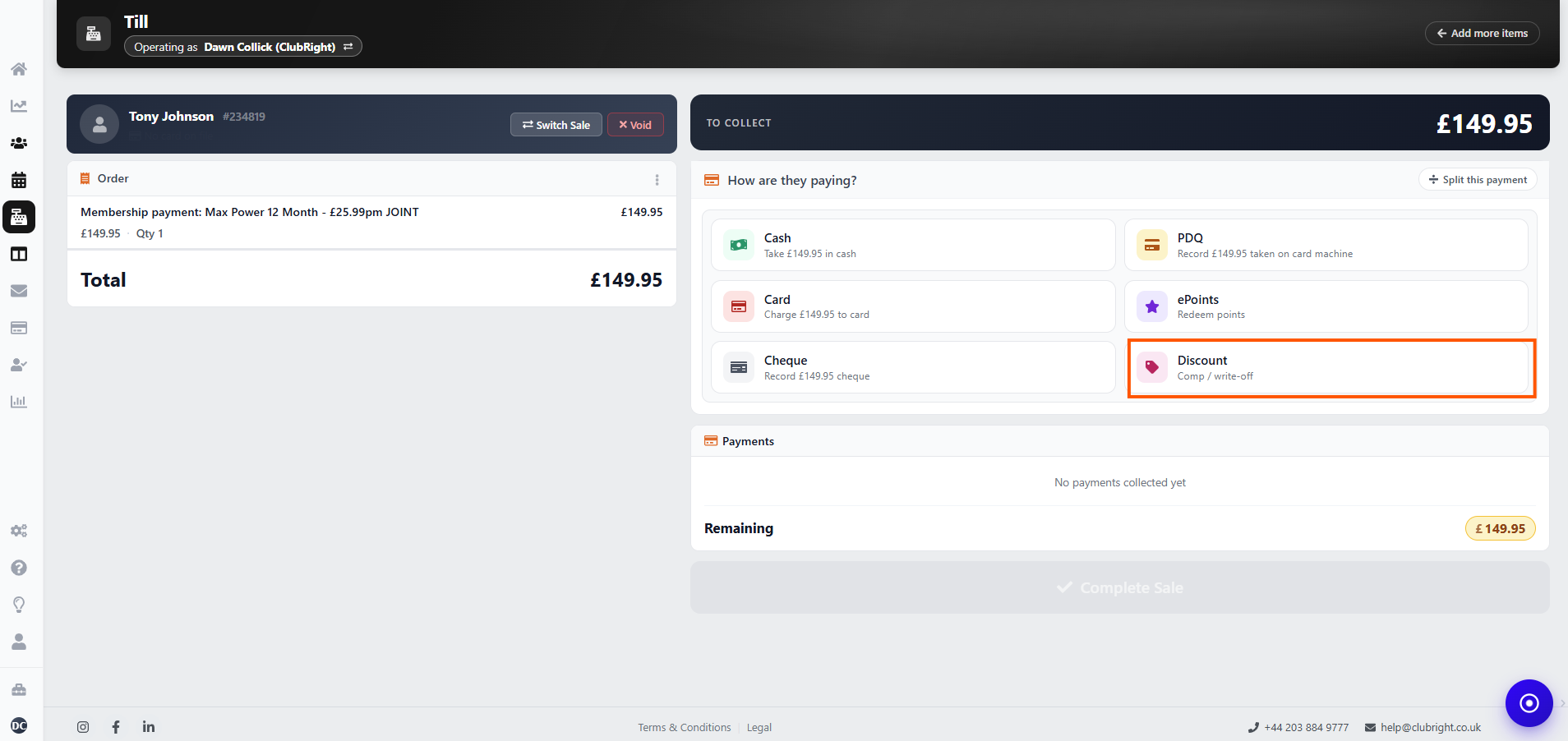
Under the payment options, select Complimentary / discount.
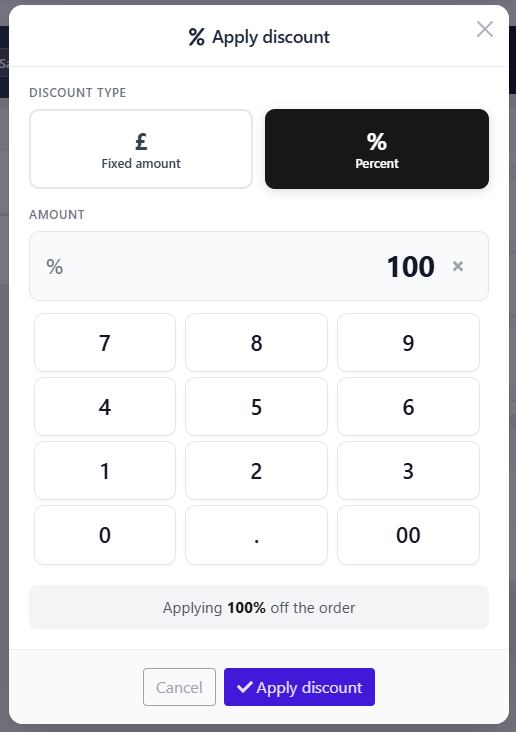
Choose £ Fixed amount and enter the full amount in the till, or % Percent and enter 100%. The discount has to cover everything in the till, otherwise the rest has to be paid there and then. To write off only part of the debt, see "How do I write off part of a member's debt?" below.
Select Apply discount and complete the transaction.
If Take payment isn't showing
On Payments > Debtors, some members don't show Take payment:
Members on Direct Debit show Add to DD instead. Add to DD collects the debt through their Direct Debit. It doesn't clear it.
Members with a retry already queued show neither option.
For members on Direct Debit, open their profile and use Sell. This opens the till with their outstanding balance, so you can follow steps 3–6 above to apply the write-off.
For a member with a retry queued, cancel the retry first. Until it's cancelled, the amount being retried shows as PENDING, not DUE, so there's no balance to take or write off. Once the retry is cancelled, use Sell on their profile and the balance is there to take or write off. See "Can I stop a reattempt and take payment another way?" in Why has a member's Direct Debit failed?
If the retry has already gone to the bank (you'll see N/A next to the request instead of the bin icon), you can't cancel it. Wait for the result: if it fails, the amount is owed again and you can take it or write it off. See "If a Direct Debit retry is already booked" in Troubleshooting overdue members.
Can I write off a debt on a membership that has ended?
No, there's nothing left to write off in ClubRight once a membership has ended. When you cancel a membership that still owes money, the member stops showing as overdue straight away. The till no longer offers that membership's balance, and the amount stays recorded on the old membership under previous memberships.
So if you want to write a debt off, do it before you cancel the membership. If it has already ended, add a note to the member's profile, for example "Left owing £20, written off 19 Nov".
⚠️ Note: Don't ring up a product in the till at the amount owed to clear it. The money would be recorded as a sale, but it isn't linked to the membership, which still shows the amount as unpaid.
If a member paid on your card machine instead of by Direct Debit, see "A member paid on our card machine instead of by Direct Debit" in Troubleshooting overdue members.
Option 2
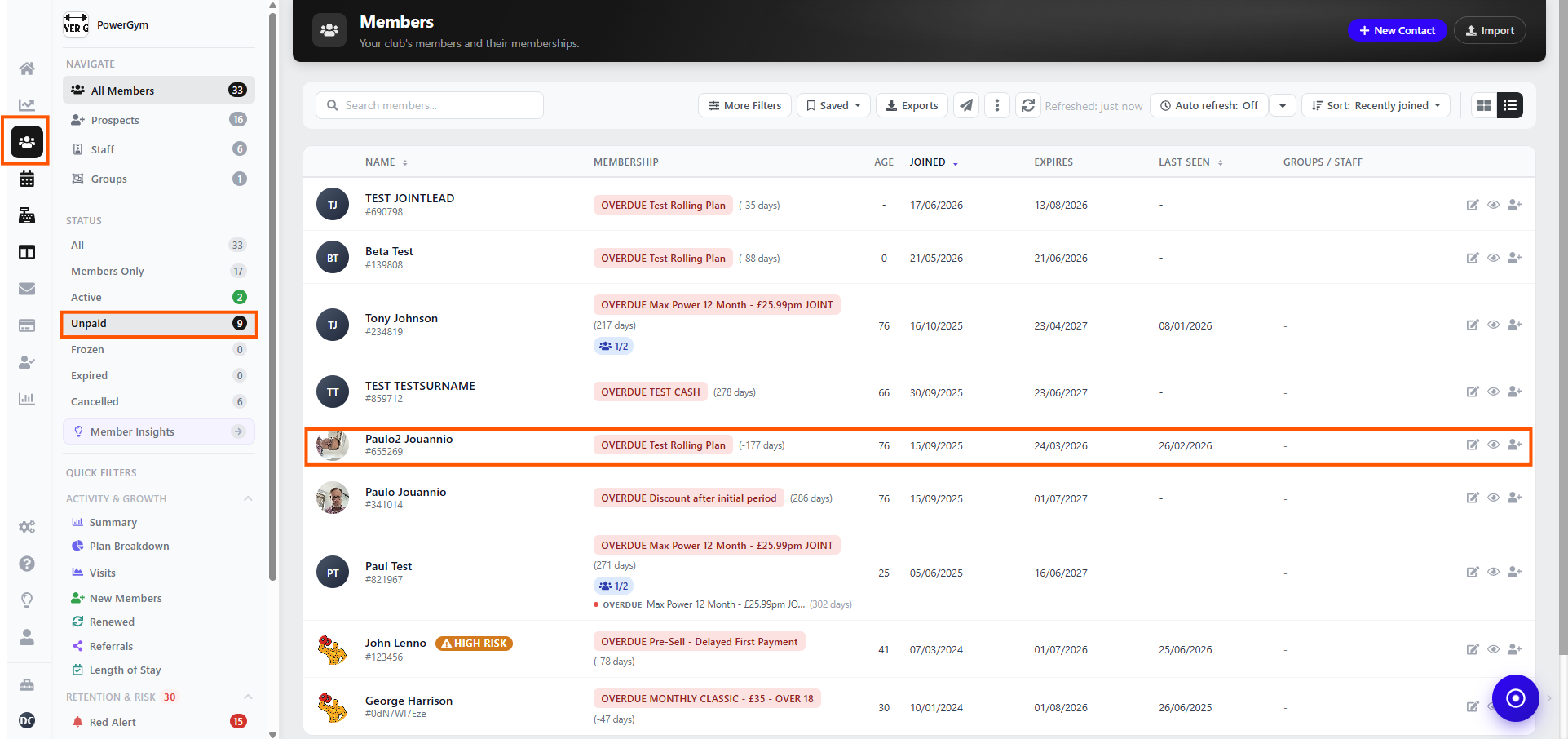
Go to Members > Unpaid.
Find and select the member who owes money.
In the member panel, select Take payment.
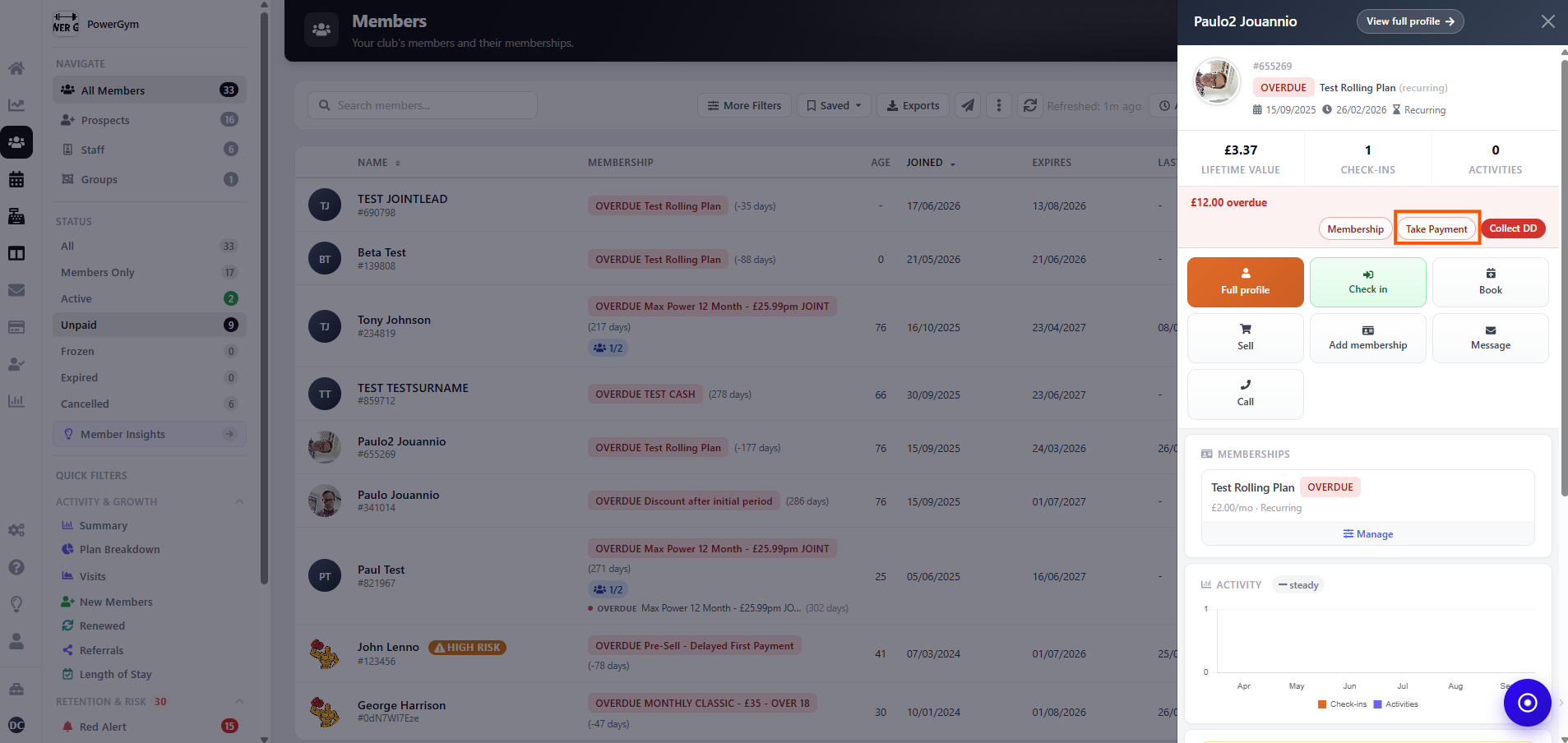
Follow steps 3–6 in Option 1 to apply the write-off.
How do I write off part of a member's debt?
Use Take part payment in the till to set the amount you want to write off, then discount all of it. The rest stays owing on the membership.
- Go to Payments > Debtors and select Take payment, or click Collect and then Take payment on the member's overdue membership.
- In the till, click Take part payment next to How are they paying?.
- Enter the amount to write off, for example 39, and click Set amount.
- Select Complimentary / discount, choose £ Fixed amount, enter the same amount and click Apply discount. There's nothing left to pay, so the sale completes straight away.
The member still owes the rest and shows as overdue until it's paid.
Take part payment only shows before anything else is added to the sale. If you've already applied a discount, click Discard sale and start again.
Can a member pay what they owe in smaller amounts?
Yes. Take each amount at the till with Take part payment. Whatever they don't pay stays owing on the membership.
- Go to Payments > Debtors and select Take payment, or click Collect and then Take payment on the member's overdue membership.
- In the till, click Take part payment next to How are they paying?.
- Enter the amount they're paying today and click Set amount.
- Choose how they're paying, for example Cash, and finish the sale.
Each payment clears the oldest amount owed first. ClubRight can't spread the balance over future dates for you, so take each payment when the member pays it. Until it's all paid, the member shows as overdue and can't check in.
For Direct Debit members, Collect by DD and Add to DD collect the whole overdue amount, not part of it. To take it in smaller amounts, use the till.
If I write off a debt, can I still see it if they rejoin?
Only if you go looking for it. ClubRight doesn't warn staff about money owed on an old membership when someone rejoins, whether you wrote the debt off or not.
- If you write it off, the month shows as PAID, and the write-off is listed in View full schedule as a Sale row, the same as a payment. Only the sale in the member's Purchases shows it was a discount, for example "Discount (Fixed) 39.00 off".
- If you cancel without writing it off, the membership ends straight away, the member comes off Payments > Debtors and their profile no longer shows them as overdue. The amount still owed stays on the old membership, which you can open from the previous memberships on their profile.
So staff know if they come back, add a note to the member's profile before you write off or cancel, for example "Left owing £78, written off 3 Nov".